Engineering

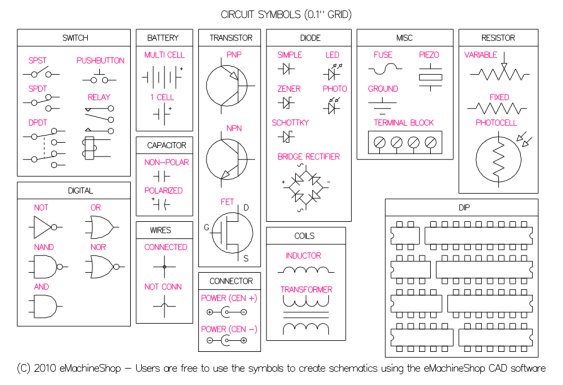
Electronic Symbols

You can use the eMachineShop CAD software to create electronic schematics. 

To create a schematic:

  1. Download the CAD software.
  2. Download and open the symbol library.
  3. In Edit | Preferences | Grid set distance to .05".
  4. On the left toolbar enable Snap to Grid.
  5. Cut & paste needed symbols into a new drawing. (You might find it convenient to copy the entire set of symbols to your drawing and remove upon completion.)
  6. Add the appropriate connections.
circuit_symbols_V3
Download CAD Software

"We are so impressed with your site!"
- Edward Paro

 
Pad2Pad.com : Design printed circuit boards online. Everything you need to build projects
and products is right here online!
eMachineShop.com | 31 Industrial Ave. | Mahwah, NJ 07430 | Phone 201-962-7511 | Questions? Contact us.

© 2012 eMachineShop.com | Admin | Site by Paradigm Site Ensemble CMS Copyright © 2012 Paradigm New Media, LLC. All rights reserved.