Preferences
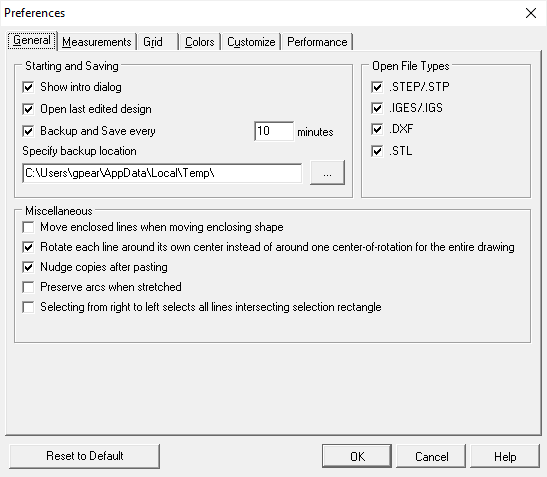
Set Preferences
- Choose menu Edit > Preferences > General.
- Check the desired settings.
- Click OK.
Set Units of Measure
Change what unit of measure dimensions and angles are displayed in.
- Choose menu Edit > Preferences > Measurements.
- Check the desired units of measure.
- Click OK.
Grid View
Toggle showing the grid in the workspace.
- Choose menu Edit > Preferences > Grid.
- Check Show Grid and set grid specifications below.
- Click OK.
Set Line Colors
Change the colors associated with lines, selections, and the workspace.
- Choose menu Edit > Preferences > Colors.
- In the associated box, set the color preference for each aspect.
- Click OK.
Customization
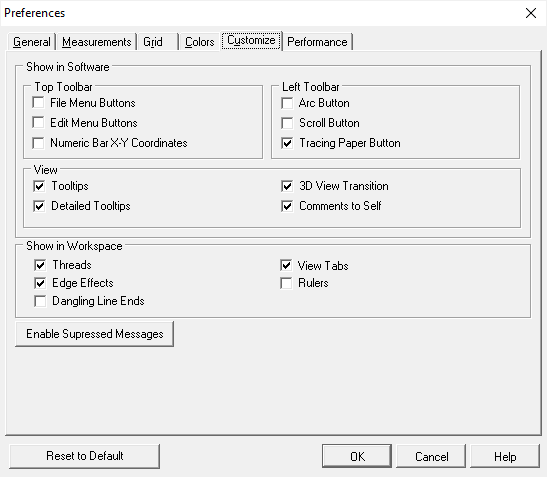
Toggle multiple convenience features, tools, and icons.
- Choose menu Edit > Preferences > Customize.
- Check the desired features, tools and icons.
- Click OK.